
A Practical Guide to Writing Clear, Consistent, Unambiguous and Verifiable Requirements Using EARS Notation
Requirements engineering is one of the most important activities in systems and software development. Whether engineers are developing aircraft engine control systems, flight control computers, satellite payloads, defence systems, automotive electronics or industrial automation, the quality of the requirements directly influences the quality of the final product.
Poorly written requirements can result in misunderstandings, incorrect implementations, design changes, verification failures, increased development costs and project delays.
One of the approaches developed to address these challenges is EARS – Easy Approach to Requirements Syntax.
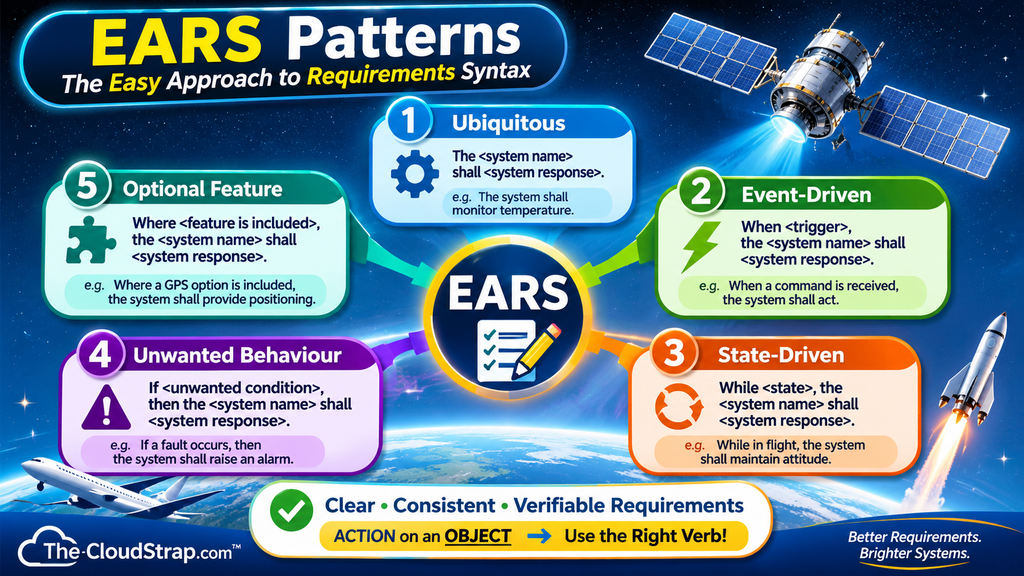
EARS provides a structured way of writing requirements using a small number of predefined sentence patterns. Instead of allowing engineers to write requirements using unrestricted natural language, EARS introduces a consistent structure that helps identify system conditions, triggering events, system responsibilities, and expected responses.
This guide explains the fundamentals of EARS, its five primary requirement patterns, how to construct good requirements, common mistakes to avoid, and practical examples from aerospace and satellite engineering.
By the end of this article, you should understand how to transform poorly written requirements into clear, structured, and verifiable engineering requirements.
1. What Is EARS (Easy Approach to Requirements Syntax)?
The Easy Approach to Requirements Syntax (EARS) is a structured requirements-writing technique that gently constrains natural language to improve the quality of textual requirements.
EARS was developed by Alistair Mavin and colleagues at Rolls-Royce PLC and was first published in 2009 at the 17th IEEE International Requirements Engineering Conference.
The original research was motivated by challenges encountered when analysing airworthiness regulations and extracting requirements for aircraft engine control systems.
The engineering team identified recurring problems in conventional requirements, including ambiguity, vagueness, complexity, omissions, duplication, unnecessary wording, inappropriate implementation details, and untestability.
Rather than introducing a complicated mathematical notation or graphical modelling language, the team developed a small set of sentence structures that engineers could easily understand and apply.
These structures became the EARS patterns.
Today, EARS is used across multiple engineering domains. Its official website identifies organisations including Airbus, Bosch, Dyson, Honeywell, Intel, NASA, Rolls-Royce and Siemens as organisations using the approach.
The primary objective of EARS is simple:
To help engineers write requirements that communicate exactly what a system must do, under which conditions it must do it, and what response is expected.
Original research paper: Mavin et al. (2009), Easy Approach to Requirements Syntax, IEEE International Requirements Engineering Conference, pages 317–322.
2. Why Do We Need EARS in Requirements Engineering?
Before understanding the EARS patterns, it is important to understand the problems associated with conventional natural-language requirements.
Consider the following requirement:
Poor requirement:
“The system should quickly notify the operator whenever a problem occurs.”
Although the statement appears understandable, it introduces several questions:
- What does “quickly” mean?
- Which system is responsible for generating the notification?
- What types of problems should trigger the notification?
- Who is the intended operator?
- How should the notification be presented?
- What is the maximum acceptable notification delay?
Different engineers may interpret this requirement differently.
The software engineer might implement a notification within five seconds, whereas the system architect might expect a response within one second.
The verification engineer might not know which fault conditions must be tested.
This creates unnecessary discussions during design, implementation, and verification.
EARS addresses many of these problems by introducing a consistent sentence structure.
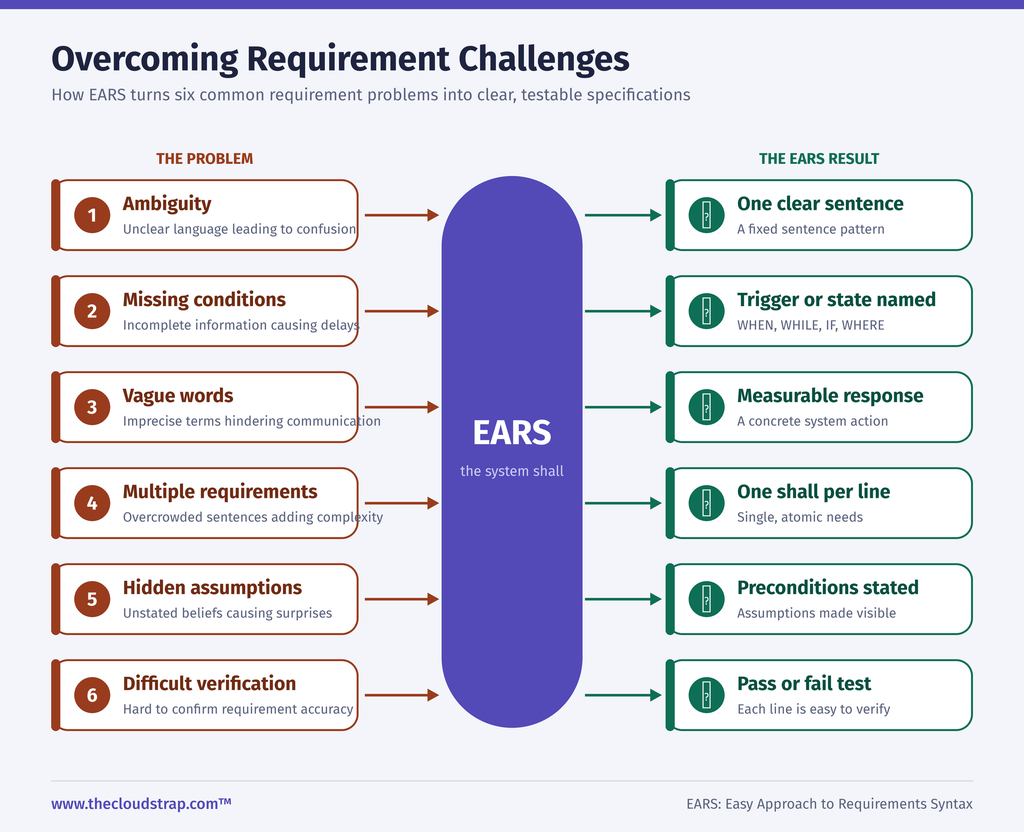
Common problems with conventional requirements
| Problem | Explanation |
|---|---|
| Ambiguity | A requirement can have multiple interpretations. |
| Vagueness | Words such as quickly, efficiently and adequately are not measurable. |
| Complexity | Multiple behaviours or conditions are combined into one statement. |
| Omission | Important system behaviours, particularly fault responses, are missing. |
| Duplication | The same requirement is repeated in different places. |
| Wordiness | Unnecessary wording makes requirements difficult to understand. |
| Inappropriate implementation | Requirements describe how to implement something instead of what the system must achieve. |
| Untestability | There is no objective method of demonstrating whether the requirement has been satisfied. |
The original EARS research specifically investigated these eight problems.
In its aircraft engine control system case study, the authors reported that the average requirement length decreased from 36.9 words to 25.6 words after applying EARS. The number of individual requirements increased from 36 to 47 because compound requirements were separated into simpler statements.
The study also reported significant improvements across all eight problem categories.
An important qualification is that the original study was relatively small and focused on high-level safety-related requirements. EARS should therefore be treated as an effective requirements-writing technique, not a guarantee that every requirements defect will disappear.
3. Understanding the EARS Requirement Structure
The central concept behind EARS is that requirements should follow a logical and consistent sentence structure.
The generic structure can be represented as:
[Optional preconditions] + [Optional trigger] + [System name] + SHALL + [System response]
A practical representation is:
While <precondition>, when <trigger>, the <system name> shall <system response>.
Not every requirement needs all these elements.
Depending on the required behaviour, an engineer selects one of the five primary EARS patterns.
The original EARS ruleset establishes the following structural principles:
- Zero or more preconditions.
- Zero or one trigger.
- One clearly identified system name.
- One or more system responses.
The order of the clauses is important because it follows the logical sequence in which the requirement becomes applicable.
For example:
While the aircraft is on the ground, when reverse thrust is commanded, the Engine Control System shall enable thrust reverser deployment.
Here:
- Preconditions: The aircraft is on the ground.
- Trigger: Reverse thrust is commanded.
- System name: Engine Control System.
- System response: Enable thrust reverser deployment.
The requirement clearly identifies the conditions under which the system must perform the required behaviour.
This makes the requirement easier to understand, review, and verify.
4. The Five Primary EARS Requirement Patterns
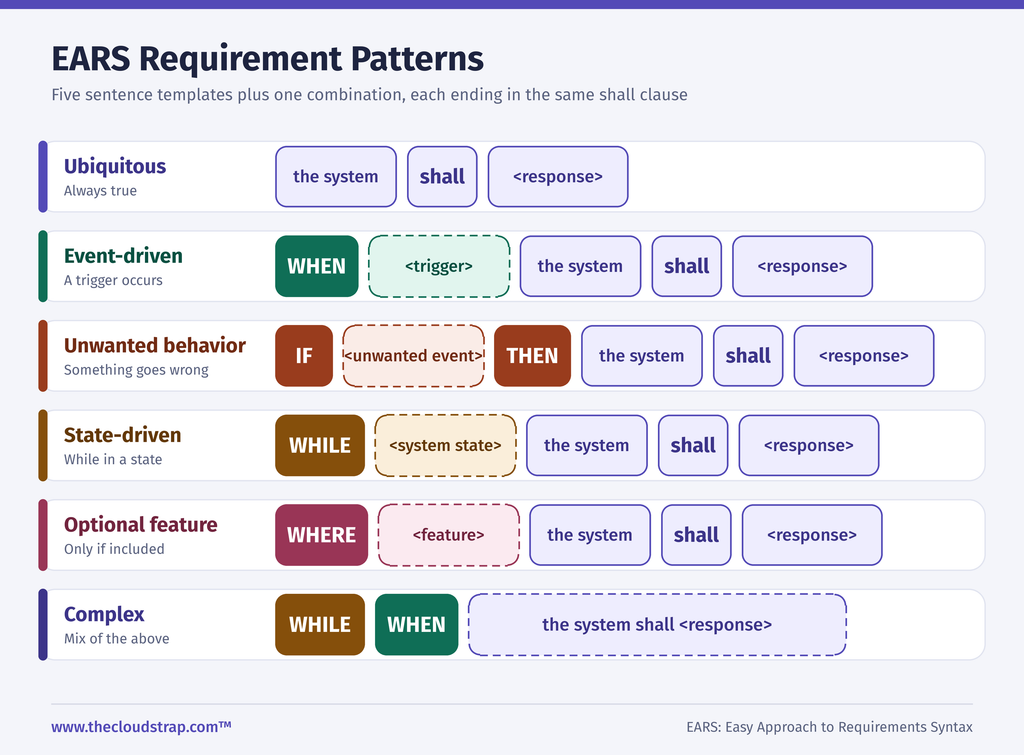
EARS contains five primary requirement patterns:
- Ubiquitous requirements.
- Event-driven requirements.
- State-driven requirements.
- Unwanted behaviour requirements.
- Optional feature requirements.
A sixth category, known as complex requirements, combines multiple EARS clauses to describe behaviour involving several conditions.
Let’s understand each pattern with practical examples.
4.1 Ubiquitous Requirements (Always Active)
A ubiquitous requirement describes a system behaviour or characteristic that must always be satisfied.
It does not depend on a particular event, operational state or optional feature.
Syntax:
The <system name> shall <system response>.
Example 1 – Aerospace:
Poor requirement:
“The flight control system should prevent excessive aircraft pitch.”
Improved EARS requirement:
“The Flight Control System shall limit the commanded pitch angle to the approved operational envelope.”
The requirement is always applicable whenever the system performs its intended function.
Example 2 – Satellite Engineering:
“The Satellite Management System shall maintain a unique identifier for each registered satellite.”
Example 3 – Software Engineering:
“The Requirements Management System shall assign a unique identifier to every approved requirement.”
When should you use ubiquitous requirements?
Use this pattern when the requirement describes a fundamental system responsibility that is not dependent on a particular triggering event or operational state.
Typical applications include:
- System configuration constraints.
- Data integrity requirements.
- Interface characteristics.
- Identification and addressing.
- Fundamental operational capabilities.
- Persistent system properties.
4.2 Event-Driven Requirements (When a Trigger Occurs)
An event-driven requirement defines the system response when a particular event or trigger occurs.
The keyword WHEN identifies the triggering event.
Syntax:
When <trigger>, the <system name> shall <system response>.
Example 1 – Aerospace:
Poor requirement:
“The engine controller should activate ignition when necessary.”
Improved EARS requirement:
“When an ignition command is received from the Engine Control Interface, the Engine Control System shall activate the ignition output.”
The triggering event is now clearly identified.
Example 2 – Satellite Engineering:
“When a telecommand is received from the Ground Control Segment, the Satellite Management System shall validate the telecommand before executing the requested operation.”
Example 3 – Network Management:
“When a communication session is successfully established, the Network Management System shall record the session start time.”
When should you use event-driven requirements?
Use this pattern when system behaviour is initiated by an identifiable event.
Typical triggers include:
- Operator commands.
- Sensor events.
- External messages.
- Data reception.
- Button presses.
- State transition requests.
- Timer expiration events.
A useful distinction is that an event represents something that happens, rather than a condition that remains true.
For example:
“While the aircraft is in flight” represents a state.
“When the pilot selects autopilot” represents an event.
4.3 State-Driven Requirements (While a Condition Exists)
A state-driven requirement defines behaviour that must remain active while the system is in a particular state or condition.
The keyword WHILE identifies the state or precondition.
Syntax:
While <specific state>, the <system name> shall <system response>.
Example 1 – Aerospace:
Poor requirement:
“The flight control system should maintain the aircraft attitude during flight.”
Improved EARS requirement:
“While the aircraft is in flight, the Flight Control System shall maintain the commanded aircraft attitude within the approved control limits.”
Example 2 – Satellite Engineering:
“While the satellite is in Safe Mode, the Satellite Management System shall inhibit execution of non-essential payload operations.”
Example 3 – Network Management:
“While the network connection is in an unavailable state, the Network Management System shall display the connection status as unavailable.”
When should you use state-driven requirements?
Use this pattern when the required behaviour applies continuously throughout a particular operational state.
Common examples include:
- Aircraft in-flight or on-ground states.
- Satellite Safe Mode.
- Payload operational mode.
- Maintenance mode.
- Communication unavailable state.
- System initialisation.
- Standby or shutdown modes.
A state-driven requirement is particularly useful when working with SysML state machine diagrams because the state condition can be related to the system’s operational model.
4.4 Unwanted Behaviour Requirements (Handling Faults and Abnormal Conditions)
Unwanted behaviour requirements define how a system must respond when an undesirable event, fault or abnormal condition occurs.
This is one of the most important EARS patterns in safety-critical engineering.
The keywords IF and THEN identify the unwanted condition and the required system response.
Syntax:
If <trigger>, then the <system name> shall <system response>.
Example 1 – Aerospace:
Poor requirement:
“The system should handle sensor failures safely.”
Improved EARS requirement:
“If the airspeed sensor failure flag is set, then the Flight Control System shall reject the invalid airspeed measurement.”
The improved statement identifies the abnormal condition and the expected response.
Example 2 – Satellite Engineering:
“If the payload telemetry data fails the configured integrity check, then the Payload Management System shall reject the invalid telemetry data.”
Example 3 – Network Management:
“If the communication link becomes unavailable, then the Network Management System shall generate a communication failure event.”
When should you use unwanted behaviour requirements?
Use this pattern when describing responses to:
- Hardware failures.
- Software faults.
- Invalid input data.
- Communication failures.
- Sensor failures.
- Timeouts.
- Unexpected commands.
- Out-of-range measurements.
- Data corruption.
- Invalid operational conditions.
An important point is that unwanted behaviour requirements should not be limited to catastrophic failures.
They should also cover disturbances, abnormal inputs, deviations from expected user behaviour and unexpected interactions between systems.
For safety-critical systems, identifying these requirements early is particularly important because missing failure-response requirements can create significant design and verification gaps.
4.5 Optional Feature Requirements (Where a Feature Exists)
Optional feature requirements describe behaviours that apply only when a particular optional feature or capability is included in the system.
The keyword WHERE identifies the optional feature.
Syntax:
Where <optional feature is present>, the <system name> shall <system response>.
Example 1 – Aerospace:
“Where the aircraft includes an automatic landing capability, the Flight Control System shall provide the required automatic landing control functions.”
Example 2 – Satellite Engineering:
“Where the satellite includes an optical payload, the Payload Management System shall provide the required optical payload operational controls.”
Example 3 – Network Management:
“Where redundant communication links are installed, the Network Management System shall monitor the operational status of each communication link.”
When should you use optional feature requirements?
Use this pattern when the requirement is applicable only to a particular product configuration or system variant.
Examples include:
- Optional satellite payloads.
- Redundant communication interfaces.
- Additional navigation sensors.
- Optional aircraft functions.
- Different hardware configurations.
- Product variants with different capabilities.
The important distinction is that WHERE identifies whether a feature is included in the system configuration. It should not be confused with WHILE, which describes an operational state.
5. Complex EARS Requirements – Combining Multiple Conditions
Some system behaviours cannot be adequately described using a single EARS pattern.
For example, a system may need to perform an operation only when:
- A particular operational state exists.
- A triggering event occurs.
- An additional condition is satisfied.
EARS allows multiple clauses to be combined to describe such behaviour.
Example 1 – Aerospace:
“While the aircraft is in flight, when reverse thrust is commanded, the Engine Control System shall inhibit thrust reverser deployment.”
This requirement combines:
- State-driven: While the aircraft is in flight.
- Event-driven: When reverse thrust is commanded.
- System response: Inhibit thrust reverser deployment.
Example 2 – Satellite Engineering:
“While the satellite is in Safe Mode, when a payload activation command is received, the Satellite Management System shall reject the payload activation request.”
Example 3 – Unwanted Behaviour with Multiple Conditions:
“While the satellite is in its nominal operational mode, if the payload temperature exceeds the configured maximum operating limit, then the Payload Management System shall initiate the defined payload protection response.”
Complex EARS requirements are useful for representing conditional system behaviour.
However, engineers should avoid unnecessarily combining several conditions and responses into a single requirement.
If a requirement contains several independent behaviours, split it into separate requirements.
The objective is not to create the longest possible EARS sentence. The objective is to communicate one clear engineering obligation.
6. How to Write Good Requirements Using EARS
Understanding the five EARS patterns is only the beginning.
Selecting the correct pattern does not automatically produce a high-quality requirement.
An engineer must also understand the system behaviour, identify the responsible system, define the relevant conditions, and ensure that the expected response can be verified.
The following approach provides a practical method for writing requirements.
Step 1: Understand the Requirement Source
Before writing a requirement, understand where the requirement originates.
Possible sources include:
- Stakeholder requirements.
- System requirements.
- Customer specifications.
- Regulatory documents.
- Safety assessments.
- Interface control documents.
- Operational concepts.
- System architecture.
- Higher-level requirements.
A requirement should not be created simply because an engineer believes a particular feature would be useful.
There must be a valid engineering justification or source.
Step 2: Identify the Responsible System
Identify which system or subsystem is responsible for performing the required behaviour.
Avoid using generic descriptions such as:
- The system.
- The software.
- The controller.
- The application.
- The equipment.
Instead, use the actual system or subsystem name.
For example:
Poor:
“The system shall monitor payload temperature.”
Better:
“The Payload Management System shall monitor payload temperature.”
This is particularly important in complex systems involving multiple interacting subsystems.
Step 3: Identify the Requirement Type
Determine whether the requirement describes:
- Behaviour that is always active.
- Behaviour initiated by an event.
- Behaviour applicable during a specific state.
- Behaviour in response to an unwanted condition.
- Behaviour associated with an optional feature.
Select the appropriate EARS pattern.
Step 4: Define the Trigger or Preconditions
For event-driven requirements, identify the exact triggering event.
For state-driven requirements, identify the operational state.
For unwanted behaviour requirements, identify the fault, abnormal condition or unwanted event.
Avoid vague descriptions such as:
- When required.
- When appropriate.
- If necessary.
- During normal operation.
- When the system detects a problem.
Instead, identify the exact event or condition.
For example:
Poor:
“When a problem occurs, the system shall generate an alarm.”
Better:
“When the communication link loss flag is set, the Network Management System shall generate a communication failure alarm.”
Step 5: Define the Expected System Response
Describe exactly what the system must do.
The response should be observable and objectively verifiable.
For example:
Poor:
“The Payload Management System shall handle invalid telemetry.”
Better:
“If the received telemetry packet fails the configured CRC validation, then the Payload Management System shall reject the packet.”
The improved requirement identifies a specific condition and response.
Step 6: Use Shall Correctly
The word SHALL is conventionally used to express a mandatory requirement.
Avoid using words such as:
- Should.
- May.
- Might.
- Could.
- Normally.
- Ideally.
These expressions can introduce uncertainty about whether the behaviour is mandatory.
For example:
Poor:
“The Satellite Management System should record all telecommands.”
Better:
“The Satellite Management System shall record every successfully received telecommand.”
The word SHALL communicates an obligation.
Step 7: Make the Requirement Verifiable
Every requirement should have a clear verification approach.
Consider the following:
“The Network Management System shall respond quickly to communication failures.”
How would a verification engineer demonstrate compliance?
The word “quickly” does not provide an objective acceptance criterion.
A better requirement is:
“If the communication link loss flag is set, then the Network Management System shall generate a communication failure notification within 2 seconds.”
The verification engineer can now:
- Simulate a communication link failure.
- Monitor the communication link loss flag.
- Measure the time taken to generate the notification.
- Compare the measured response time against the 2-second requirement.
The requirement now provides a measurable acceptance criterion.
The numerical threshold must, of course, be justified by the system-level need or engineering analysis rather than selected arbitrarily.
Step 8: Check Atomicity
A requirement should ideally describe one primary capability or behaviour.
Consider:
“When the satellite receives a payload activation command, the Payload Management System shall validate the command, check payload temperature, activate the payload, initialise telemetry and record the activation event.”
This requirement contains several separate behaviours.
It is better to decompose it into:
- When the satellite receives a payload activation command, the Payload Management System shall validate the received command.
- When the satellite receives a valid payload activation command, the Payload Management System shall check the payload temperature against the permitted activation limits.
- When a valid payload activation command is received, and the payload temperature is within the permitted activation limits, the Payload Management System shall activate the payload.
- When the payload is activated, the Payload Management System shall initialise the payload telemetry interface.
- When the payload activation is completed, the Payload Management System shall record the activation event.
Each requirement can now be independently reviewed and verified.
Note that atomicity does not mean that a requirement can contain only one condition. Several conditions may be necessary to define one behaviour. The important consideration is whether the requirement expresses one primary obligation.
7. Before and After: Transforming Poor Requirements into EARS
Let’s consider some practical examples that demonstrate how conventional requirements can be improved.
| Poor requirement | Improved EARS requirement |
|---|---|
| The system should monitor the battery. | The Power Management System shall monitor the battery voltage. |
| The system should send an alert when communication fails. | If the communication link loss flag is set, then the Network Management System shall generate a communication failure alert. |
| The payload should operate in imaging mode. | While the payload is in Imaging Mode, the Payload Management System shall maintain the configured imaging operational state. |
| The system should reject incorrect commands. | If a received telecommand fails command validation, then the Satellite Management System shall reject the telecommand. |
| The system should activate the payload when requested. | When a valid payload activation command is received, the Payload Management System shall initiate payload activation. |
| The system should support redundant links. | Where redundant communication links are installed, the Network Management System shall monitor the operational status of each configured communication link. |
An important observation is that converting a sentence into EARS does not necessarily resolve every ambiguity.
For example, “monitor the battery voltage” still needs an agreed measurement range, accuracy, sampling rate, and verification approach if these are necessary at the requirement’s level.
EARS provides the structure. Engineering analysis provides the missing technical detail.
8. EARS in Aerospace and Satellite Systems Engineering
EARS is particularly useful in complex systems where requirements must be communicated across several engineering disciplines.
Consider a satellite system consisting of:
- Satellite Platform.
- Payload Subsystem.
- Power Subsystem.
- Thermal Control Subsystem.
- Attitude and Orbit Control Subsystem.
- Communication Subsystem.
- Onboard Data Handling.
- Satellite Management System.
- Ground Control Segment.
Each subsystem has specific responsibilities, interfaces, and operational behaviours.
Using EARS can help engineers define these behaviours consistently.
Example: Payload Management System
Functional requirement:
“When a valid payload activation command is received, the Payload Management System shall initiate the payload activation sequence.”
State-driven requirement:
“While the payload is in Imaging Mode, the Payload Management System shall maintain the configured imaging operational parameters.”
Unwanted behaviour requirement:
“If the payload temperature exceeds the configured maximum operating limit, then the Payload Management System shall initiate the defined thermal protection response.”
Interface requirement:
“When payload telemetry data is generated, the Payload Management System shall provide the telemetry data to the Onboard Data Handling System through the defined telemetry interface.”
Example: Satellite Communication System
Event-driven:
“When a valid telecommand is received from the Ground Control Segment, the Communication Management System shall forward the telecommand to the designated onboard processing subsystem.”
Unwanted behaviour:
“If the received telecommand fails authentication, then the Communication Management System shall reject the telecommand.”
State-driven:
“While the communication subsystem is in a link-established state, the Communication Management System shall maintain the configured communication session.”
These requirements can subsequently be decomposed into lower-level subsystem and software requirements.
They can also be associated with SysML models, interface definitions, state machines, activity diagrams and verification procedures.
9. Relationship Between EARS and ISO/IEC/IEEE 29148
One common misunderstanding is that EARS is an international requirements engineering standard.
It is important to distinguish between the two.
ISO/IEC/IEEE 29148:2018 is an International Standard covering systems and software engineering requirements engineering processes and associated information items.
EARS, on the other hand, is a requirements-writing syntax that provides structured sentence templates.
The two approaches complement each other.
ISO/IEC/IEEE 29148 addresses the characteristics of good requirements, while EARS helps engineers construct requirements using a consistent natural-language structure.
The nine individual requirement characteristics addressed in ISO/IEC/IEEE 29148:2018 include:
| Characteristic | What it means |
|---|---|
| Necessary | The requirement addresses a genuine need. |
| Appropriate | The requirement is suitable for its level of system decomposition. |
| Unambiguous | It has only one intended interpretation. |
| Complete | It contains the information necessary to understand the obligation. |
| Singular | It expresses one primary requirement. |
| Feasible | It can realistically be implemented. |
| Verifiable | Compliance can be demonstrated objectively. |
| Correct | It accurately reflects the originating need. |
| Conforming | It follows the agreed requirements format and conventions. |
For engineers working in aerospace, defence and other safety-critical industries, applying EARS alongside the relevant requirements engineering standards and organisational processes can significantly improve requirements consistency.
Remember: EARS does not replace ISO/IEC/IEEE 29148. It provides a practical way to improve the structure of textual requirements.
Reference: https://www.iso.org/standard/72089.html
10. Common Mistakes to Avoid When Writing EARS Requirements
Even when engineers understand EARS, certain mistakes can reduce the quality of the resulting requirements.
Mistake 1: Using the Wrong EARS Keyword
Incorrect:
“When the aircraft is in flight, the Flight Control System shall maintain the aircraft attitude.”
Better:
“While the aircraft is in flight, the Flight Control System shall maintain the commanded aircraft attitude within the approved operational limits.”
The aircraft being in flight is a state, not an event.
Mistake 2: Using Multiple Independent Responses
Poor:
“When a fault occurs, the system shall generate an alarm, record the fault, notify the operator and initiate shutdown.”
Better:
Separate the independent system behaviours into individual requirements.
Mistake 3: Using Vague System Responses
Poor:
“The Payload Management System shall handle payload failures.”
Better:
“If the payload failure flag is set, then the Payload Management System shall transition the payload to the defined fault response state.”
Mistake 4: Introducing Unnecessary Design Constraints
Poor:
“When communication is lost, the system shall use a Kalman filter to estimate the missing position data.”
Better:
“If valid position data becomes unavailable, then the Navigation Management System shall maintain the estimated position within the specified accuracy limits for at least the defined holdover period.”
The improved example specifies the required behaviour without unnecessarily prescribing the implementation.
However, where a particular algorithm or technology is mandated by a higher-level requirement, architecture decision or safety constraint, the relevant design constraint may legitimately be specified.
Mistake 5: Making Assumptions About Missing Information
Poor:
“If the payload temperature is high, then the Payload Management System shall switch off the payload.”
Questions:
- What temperature is considered high?
- Is the temperature measured or calculated?
- Does the system require a warning before shutdown?
- Is shutdown immediate or controlled?
- Is there a recovery condition?
An engineer should resolve these questions with the relevant stakeholders and technical specialists before baselining the requirement.
Mistake 6: Treating EARS as a Substitute for Requirements Analysis
EARS is not a mechanism for discovering every missing system requirement.
It does not automatically identify missing interfaces, incorrect system boundaries, safety hazards, conflicting requirements, or incomplete operational scenarios.
Requirements analysis and validation remain essential.
11. Practical EARS Requirements Review Checklist
Before approving or baselining an EARS requirement, use the following checklist.
Requirement structure
- Does the requirement follow an appropriate EARS pattern?
- Is the correct keyword used?
- Is the responsible system explicitly identified?
- Are preconditions and triggering events clearly defined?
- Is the clause ordering correct?
Requirement quality
- Is the requirement unambiguous?
- Does it describe one primary behaviour?
- Is the requirement complete?
- Does it avoid unnecessary implementation details?
- Are vague and subjective expressions removed?
- Is the requirement consistent with other requirements?
Verification
- Can the requirement be verified through test, analysis, inspection or demonstration?
- Are measurable acceptance criteria defined where necessary?
- Are boundary conditions considered?
- Are failure and abnormal conditions addressed?
- Is the expected system response observable?
Requirements management
- Does the requirement have a unique identifier?
- Is its source documented?
- Is the parent requirement identified?
- Are relevant child requirements traceable?
- Is the verification method identified?
- Has the requirement been reviewed and approved?
A well-written EARS requirement should satisfy both the syntactical rules of EARS and the applicable quality criteria established by the project’s requirements engineering process.
12. Conclusion: Why Every Systems Engineer Should Understand EARS
Requirements engineering is not simply about documenting what a customer wants.
It is about translating stakeholder needs into clear, technically meaningful and verifiable statements that guide system architecture, design, implementation, integration and verification.
EARS provides a simple but effective approach to achieving this objective.
By using five primary sentence patterns, engineers can describe always-active behaviour, event-driven behaviour, state-dependent behaviour, unwanted behaviour and optional system capabilities in a consistent manner.
The biggest advantage of EARS is its simplicity. Engineers do not need to learn a complicated modelling language or formal mathematical notation before improving their requirements-writing skills.
However, the real value comes from applying EARS together with sound systems engineering practices, requirements analysis, traceability, verification planning and requirements validation.
For engineers working in aerospace, defence, satellite engineering, automotive and other safety-critical industries, developing a strong understanding of EARS can make a meaningful difference to the quality of engineering deliverables.
Remember these five keywords:
- WHEN – Event-driven behaviour.
- WHILE – State-driven behaviour.
- IF / THEN – Unwanted behaviour.
- WHERE – Optional features.
- SHALL – Mandatory system response.
Good requirements are not simply written. They are engineered, analysed, reviewed and verified.
And EARS provides an excellent starting point for doing that consistently.

This post was published by Admin.
Email: admin@TheCloudStrap.Com
One thought on “EARS: The Easy Approach to Requirements Syntax – A Complete Guide to Writing High-Quality Engineering Requirements”
Comments are closed.